A key per person
A key per person and per agent, so you can see the waste and cut it
You cannot cut what you cannot see. One shared provider key, or one lump invoice, hides which team, tool and agent is driving the bill. Proxen gives every person and every agent its own key, budget and log on top of accounts your company owns. That is how we find the waste in week one, and how you check the saving every month after.
Works with any harness your team already uses
















No identity on the request
Nobody can say which person or agent sent what
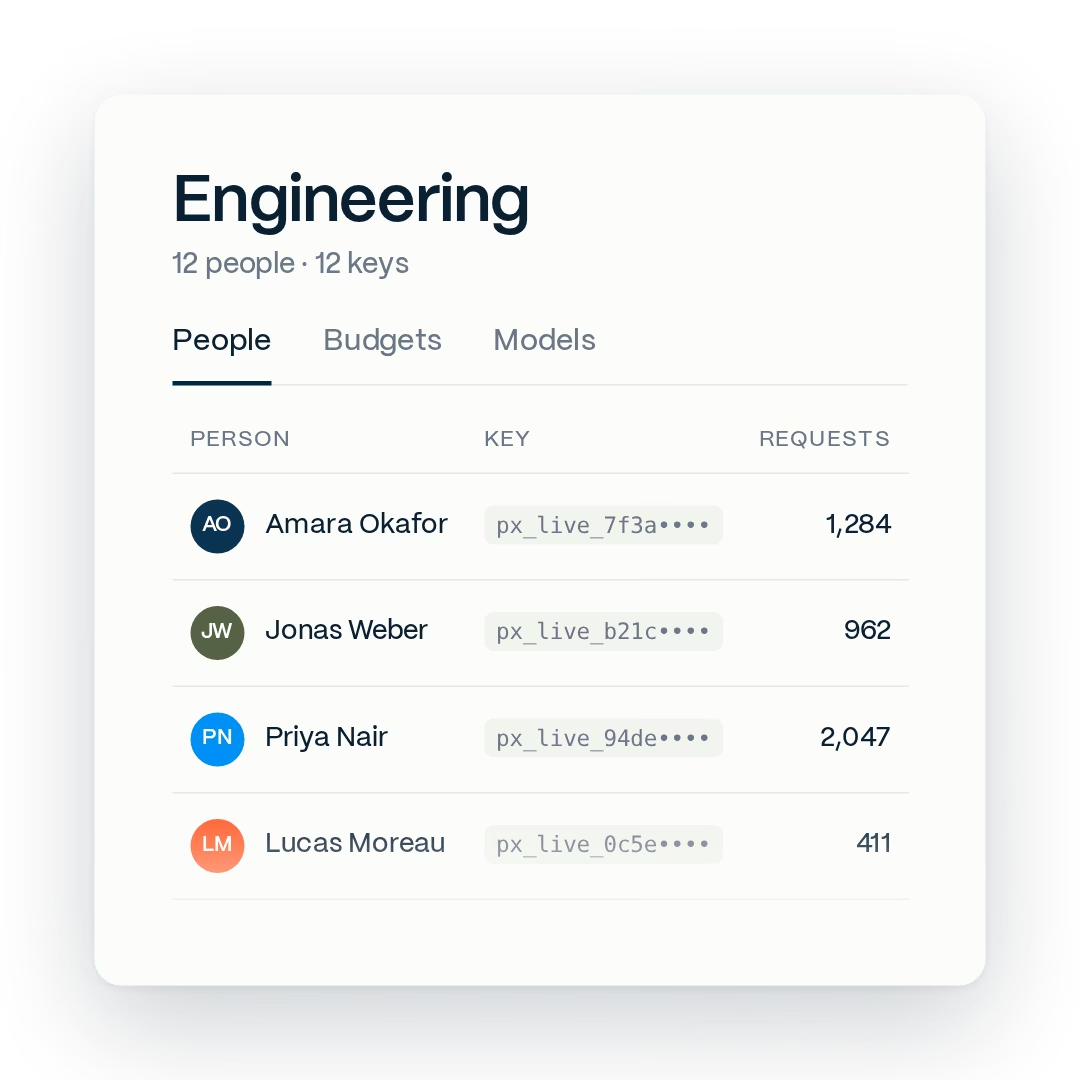
A raw provider key in a config file has no name on it. Requests go out under an identity nobody can trace, and the invoice arrives as one lump, so nobody can say which team or tool to fix first. With Proxen each person and each agent sends requests with its own key. Every request is tied to one name, and the admin sees counts and costs, not the text.
With Proxen:
- One key per person and per agent, never shared between two
- Requests and spend tied to a name, not to a team login
- Prompt and response bodies not stored unless you switch it on
 Illustrative example
No limit on an unattended agent
An agent session keeps running whether or not it is useful
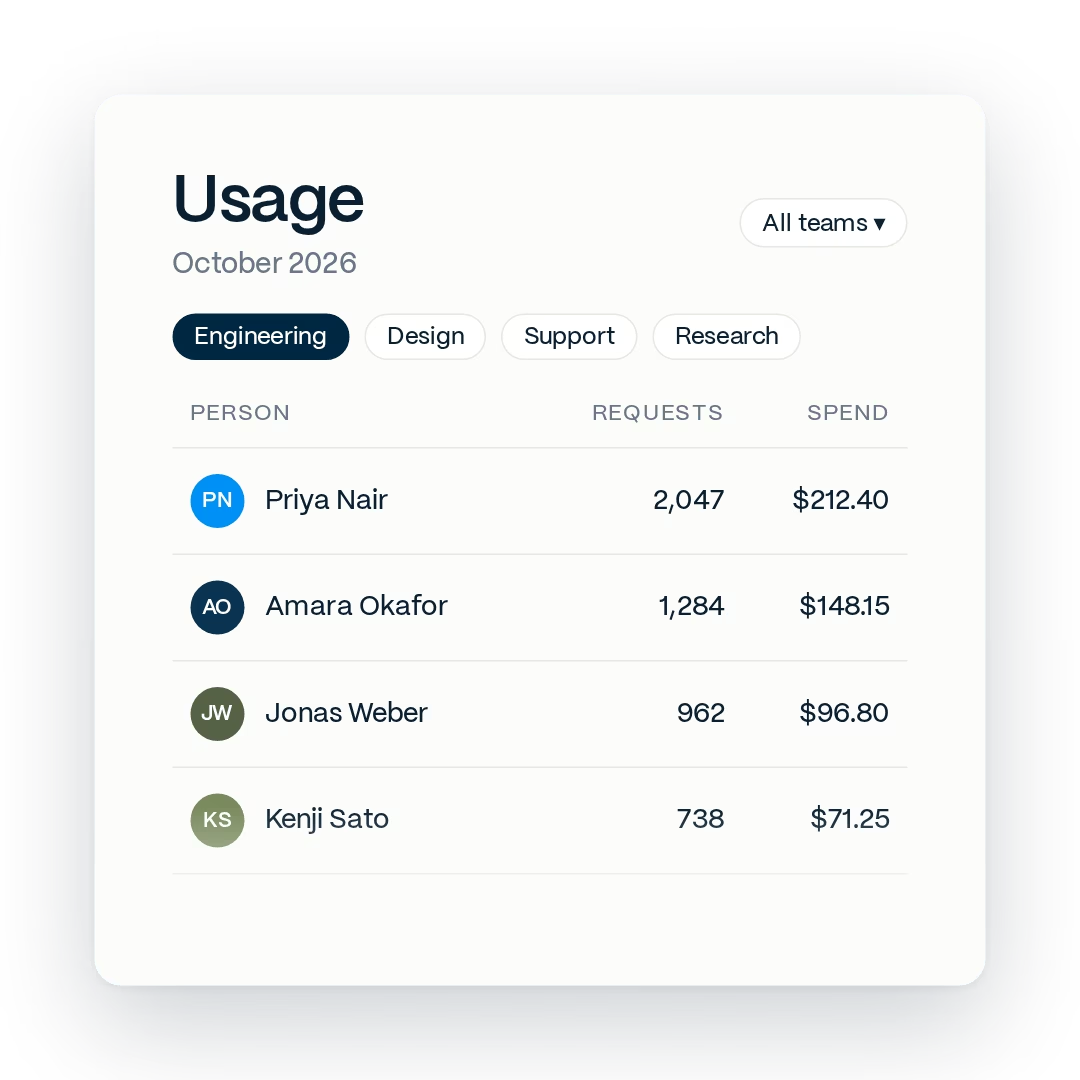
Coding agents and background services have no seat. They run on a key somebody created once, through the night and through the weekend, and nobody sees the meter until the invoice. AI agent access control means treating an agent like a person: its own key, its own model list, its own monthly budget. The console shows which agent used what and when, and a loop that keeps retrying hits its cap instead of your budget.
With Proxen:
- Each agent and service gets its own key, visible in the console
- Monthly budget per key, so an unattended run has a ceiling
- Allowed model list per team and per agent, set by you
 Illustrative example
No control before the request
Caps imposed after the invoice punish the wrong people
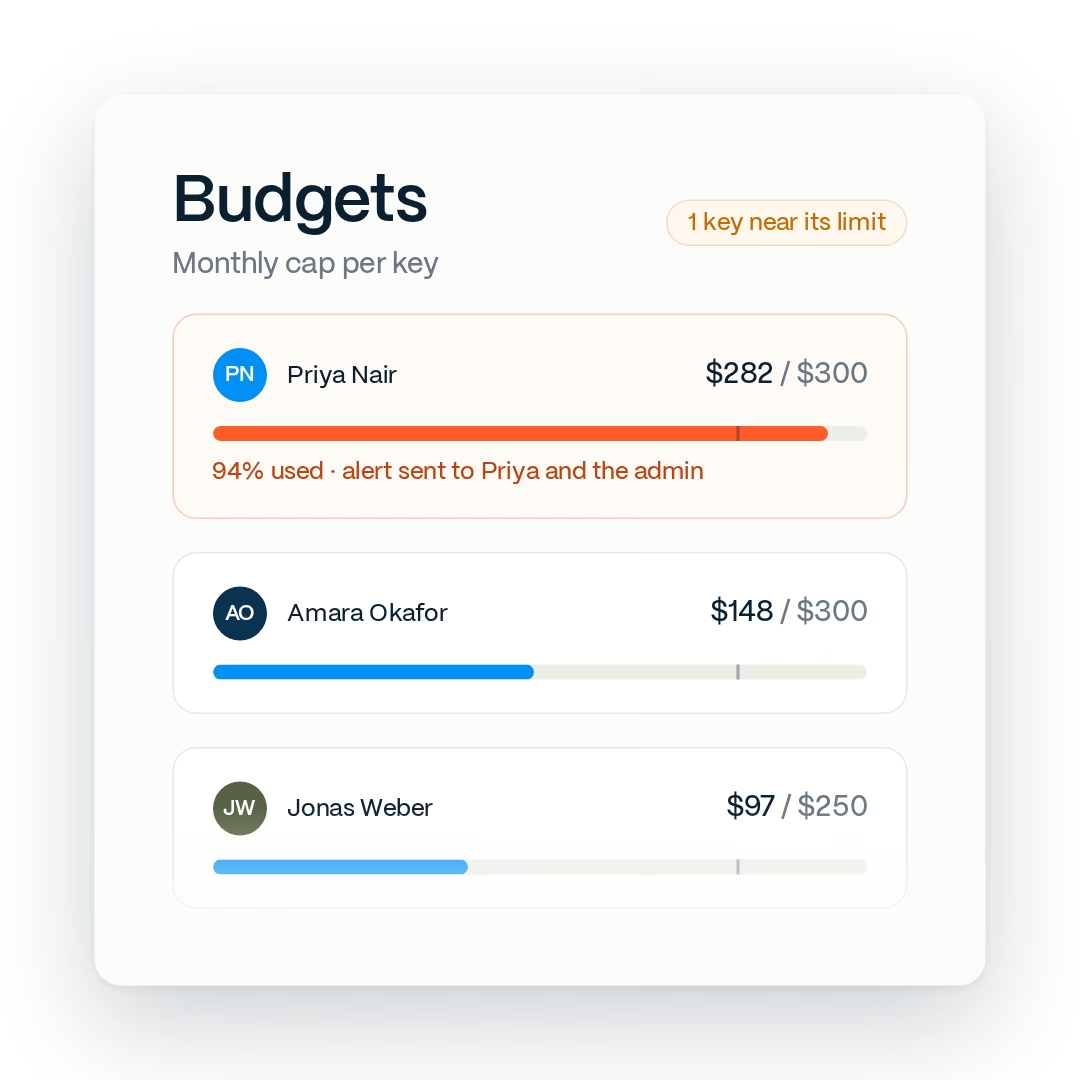
When one provider bill lands high, the usual answer is a flat limit for everyone. That freezes the engineers getting the most value and still does not explain the number. Proxen puts a budget on every key and checks it before the request goes out. When a person or agent reaches their monthly cap, their requests stop with a clear message. Everyone else keeps working. The admin can raise the cap, move budget from a quiet key, or leave it until next month.
With Proxen:
- A budget and a hard cap on every key, person or agent
- An alert at 80 percent, a hard stop at 100
- Budget moved between keys in the console, no freeze needed
 Illustrative example
No record for the review
Security cannot answer who has access, or how fast it can be cut
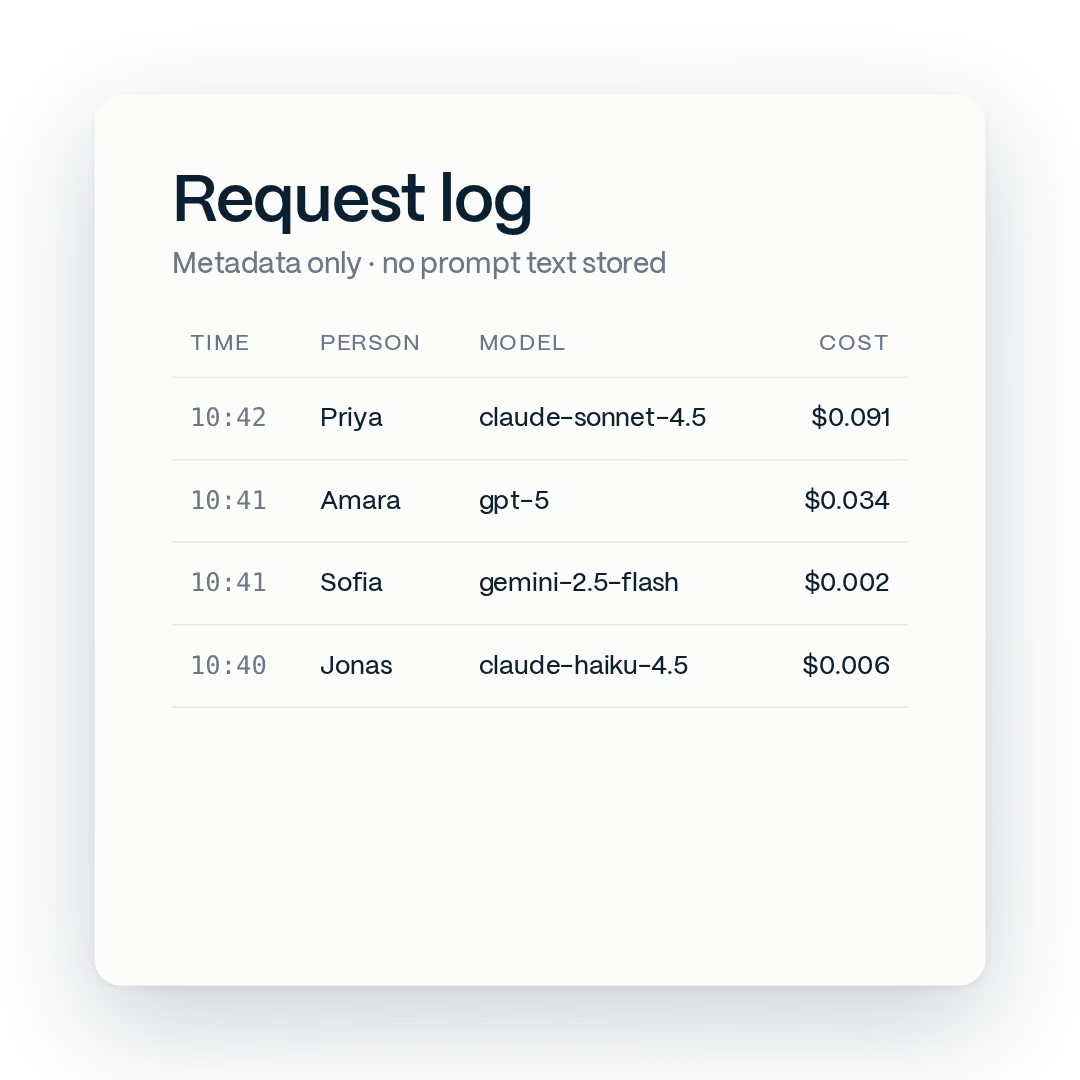
When someone leaves, a shared password still works for them, and a raw provider key still works for every script it was pasted into. When something leaks, there is no log that says who sent it. Proxen keeps a log per request: which key, which model, how many tokens in and out, what it cost, and when. That is all it keeps by default. Prompt and response text is not stored unless you turn that on. Revoking a person or an agent takes one click and touches nobody else's key.
With Proxen:
- Who, which model, how many tokens, what it cost, when
- Revoke one key in one click, the rest keep working
- Export the log for your own audit or finance review
- Prompt bodies off by default, on only if you choose
 Illustrative example
No way to see the saving
You cannot tell which change made the bill go down
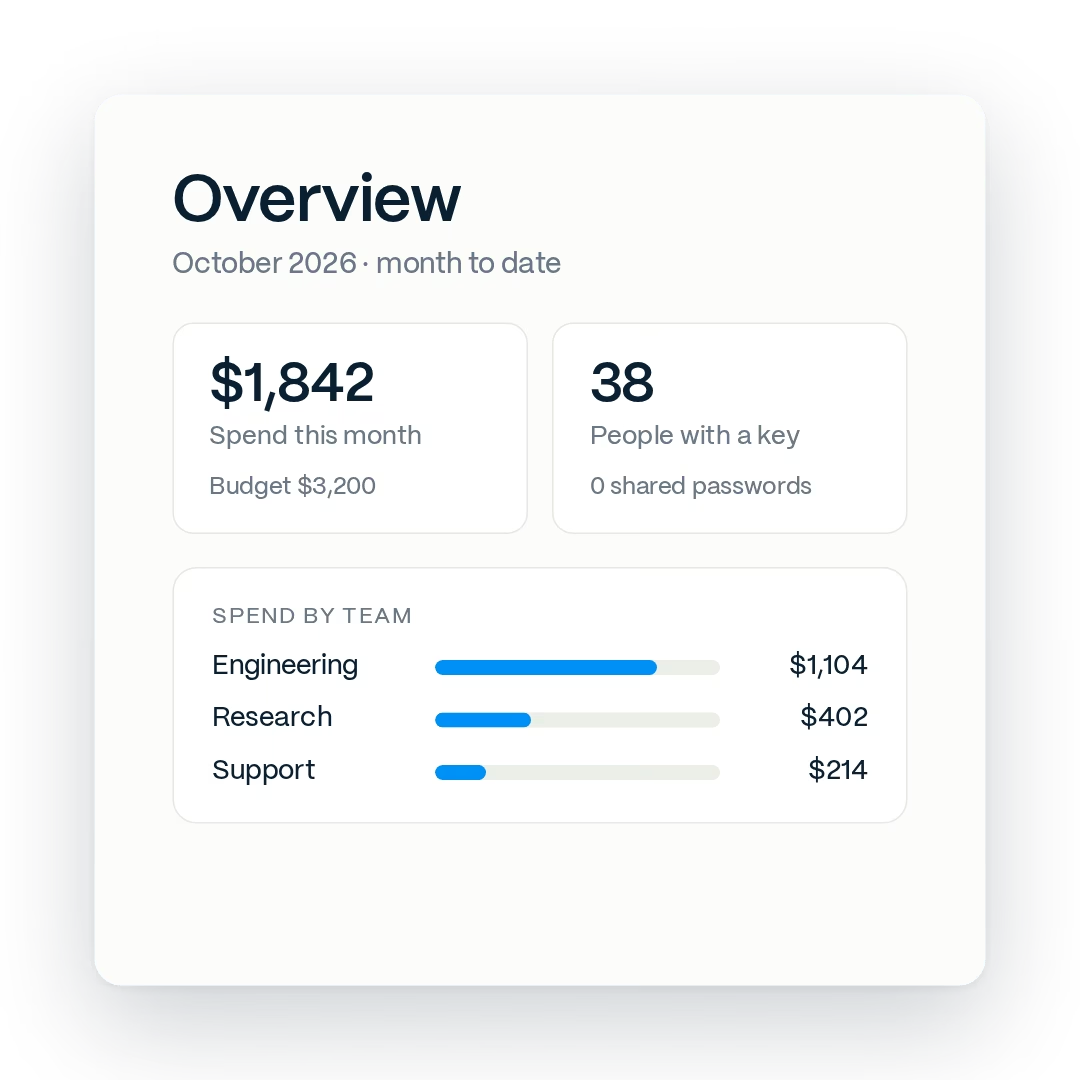
Without a name on every request, a lower bill could be a quiet month, a price cut or a real saving, and nobody can tell which. With a key per person and per agent, spend shows up by team, tool and model, before and after every change. We agree a baseline with you, then report the saving team by team. Every request runs on your company's own API accounts, so the numbers match your provider invoices.
With Proxen:
- Spend by team, tool and model, before and after
- A baseline agreed before anything changes
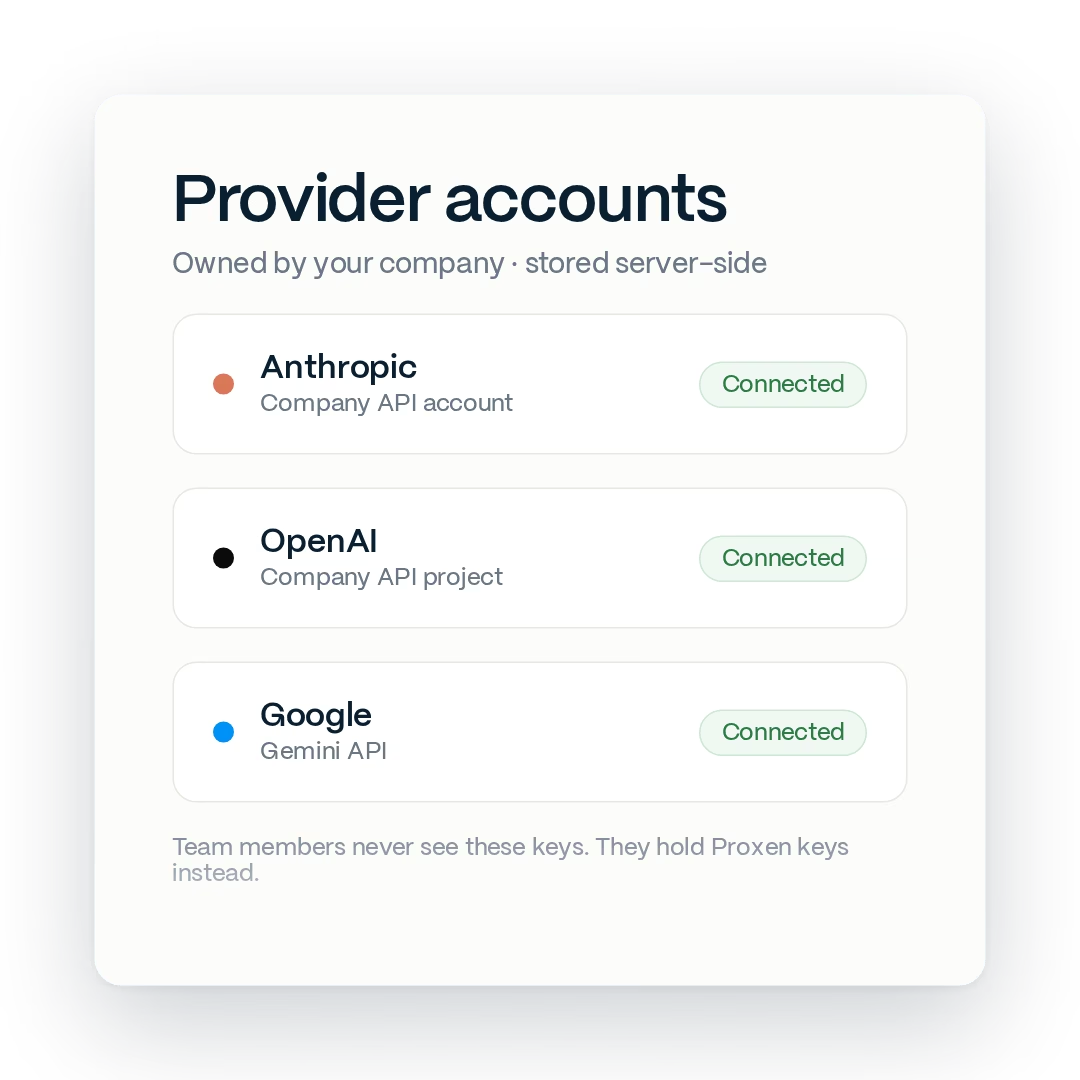
- Your provider accounts, in your name, not ours
 Illustrative example
The fix
One AI gateway, one key per identity, on accounts your company owns
Here is the whole change. Your company holds its own Anthropic, OpenAI and Google accounts, or we help you open them. Those keys go into Proxen and stay server-side. Each person and each agent gets a Proxen key with a model list, a monthly budget and a hard cap. Engineers change one base URL in Claude Code, Codex, Cursor or their SDK and carry on as before. The proxy cuts the cost of every request, and finance sees the result by person, team and cost center.
With Proxen:
- Provider keys held server-side, never on a laptop or in a repo
- One key per person and per agent, grouped into teams
- One base URL change per tool, nothing else to learn
 Illustrative example
what the rollout looks like
From one unnamed bill to spend you can see and cut
A common starting point looks like this: provider keys scattered across repos and config files, agents running on whichever key was nearest, and no idea which team or tool drove last month's bill.
The rollout starts with a free bill review and then one team. Your engineers keep the same tools and change one address. Loose provider keys are retired the same week, the proxy starts cutting cost, and the next team follows the same pattern.

What we set up with you
- Company-owned API accounts with each provider
- One key per person and per agent, grouped into your teams
- Model lists, budgets and hard caps per key
- Base URL changes in Claude Code, Codex, Cursor and SDKs
- The proxy tuned to each team's work


See where your AI money goes, by name
Why Proxen
Built to be the thing you own, not the thing you rent
Proxen sits between your people, your agents and the model providers. We build it around your setup and keep tuning it. Your accounts, your keys, your rules, and nothing in it that locks you in.
Your keys stay yours
The Anthropic, OpenAI and Google accounts belong to your company, not to us. Proxen holds the keys server-side so nobody on the team ever sees them. Leave whenever you like and nothing breaks.
Prompts are not logged by default
Proxen logs who, which model, how many tokens and what it cost. That is enough for budgets, chargeback and audits. Prompt and response bodies are not stored unless you switch it on for a team that wants them.
Savings you can check
Every request has a name, a model and a cost in the log. When the bill drops, you can see which team, tool and rule made it drop, and that the answers stayed as good. Every request runs on your company's own API accounts.
Revoke one, keep the rest
When someone leaves, or an agent misbehaves, you turn off that key. It stops working on the next request. Nobody else changes a password, re-logs in, or loses a session. Onboarding a new hire or a new agent is the same step in reverse.
Shaped to your company
Routing rules, model lists, budgets, retention and where it runs (our cloud or yours) are set with you for your setup. We change them as the rollout grows. Send us your security questionnaire and we answer it in writing before you sign.


Ready to see where your AI money goes?
Send us one month of usage. We show you which teams, tools and models drive the bill, where it leaks and what you can expect to save. Then we pilot on one team.